Perimeter Intrusion Detection: Integrating AI-Powered Analytics with UK NVR Deployments
Perimeter Intrusion Detection: Integrating AI-Powered Analytics with UK NVR Deployments
As a UK-certified installer with extensive experience in security system engineering, I, Gary Pearce, have witnessed a profound transformation in how we approach perimeter protection. The days of relying solely on basic motion detection, often leading to a deluge of nuisance alarms, are rapidly becoming a relic of the past. Today, the convergence of sophisticated AI-powered video analytics with robust Network Video Recorder (NVR) deployments offers an unprecedented level of precision and proactivity in safeguarding assets across the United Kingdom.
This article delves into the technical intricacies of integrating these advanced AI capabilities into existing or new NVR infrastructures, offering an authoritative guide for security professionals, system integrators, and facility managers looking to enhance their perimeter security posture. We will explore the architectural considerations, implementation methodologies, critical performance metrics, and compliance requirements inherent in deploying such state-of-the-art systems within the UK context.
The Evolving Landscape of Perimeter Security in the UK
Traditionally, perimeter security relied on physical barriers, lighting, and conventional CCTV systems. While foundational, these methods presented significant challenges:
1. High False Alarm Rates: Environmental factors such as swaying foliage, changes in lighting, animal movement, and adverse weather conditions frequently trigger conventional pixel-change motion detection, desensitising operators and leading to missed genuine threats.
2. Reactive Rather Than Proactive: Traditional systems primarily record events, providing retrospective evidence. Intervention often occurs after an intrusion has commenced or completed.
3. Operational Overload: Security personnel can be overwhelmed by reviewing vast amounts of footage and managing frequent, often irrelevant, alarms.
The advent of AI-powered video analytics fundamentally shifts this paradigm. By leveraging deep learning and neural networks, these systems can intelligently analyse video streams, distinguishing between critical events and environmental noise. This allows for:
- Proactive Detection: Identifying potential threats before an intrusion escalates.
- Significantly Reduced False Positives: Focusing operator attention on genuine incidents.
- Enhanced Situational Awareness: Providing rich, contextual information about detected objects (e.g., human, vehicle, animal, specific behaviours).
- Optimised Resource Utilisation: Reducing the need for constant human monitoring of every camera feed.
In the UK, the demand for robust perimeter security is driven by diverse sectors, from critical national infrastructure and logistics hubs to commercial estates and high-value residential properties. Concurrently, strict data protection regulations, primarily the General Data Protection Regulation (GDPR) and the Data Protection Act 2018, mandate careful consideration of how video data is collected, processed, and stored.
Understanding AI-Powered Video Analytics for Perimeter Detection
At its core, AI-powered video analytics applies advanced computer vision techniques to video streams to identify, classify, and track objects and their behaviours. For perimeter intrusion detection, key analytical functions include:
- Object Detection and Classification: The ability to accurately identify and categorise objects as humans, vehicles (cars, trucks, motorcycles), animals, or other specified categories. This is crucial for filtering out irrelevant events.
- Line Crossing Detection: Triggering an alarm when an object crosses a pre-defined virtual line in a specified direction.
- Area Intrusion/Zone Protection: Detecting when an object enters, exits, or loiters within a designated polygonal area.
- Object Tracking: Maintaining identification of an object as it moves across the field of view, or even between multiple cameras in more advanced systems.
- Scene Change Detection: Notifying if a camera's view is obstructed or tampered with.
These capabilities are powered by sophisticated algorithms trained on vast datasets of real-world imagery. The system "learns" to recognise patterns and differentiate between legitimate objects and environmental anomalies. This learning process often involves:
- Convolutional Neural Networks (CNNs): A class of deep neural networks specifically designed to process pixel data and extract spatial features.
- Recurrent Neural Networks (RNNs): Used for processing sequential data, useful in tracking object movement over time.
- Machine Learning Models: Continuously refined to improve accuracy and reduce false positives through feedback loops.
The effectiveness of these analytics is directly tied to the quality of the input video feed and the robustness of the underlying AI engine.
The Role of NVRs in Modern UK CCTV Deployments
Network Video Recorders (NVRs) are the backbone of contemporary IP-based CCTV systems. Unlike older DVRs that process analogue signals, NVRs connect directly to IP cameras, recording digitised video streams. Key characteristics and capabilities pertinent to AI integration include:
- IP-based Connectivity: Cameras connect via standard Ethernet, often leveraging Power over Ethernet (PoE) for simplified cabling.
- Scalability: NVRs come in various channel counts (e.g., 4, 8, 16, 32, 64+) and can be chained or integrated with Video Management Systems (VMS) for larger deployments.
- High-Resolution Support: Capable of recording multi-megapixel streams (e.g., 1080p, 4K, 8K) from multiple cameras simultaneously.
- Storage Capacity: Equipped with multiple hard drive bays, supporting RAID configurations for data redundancy, critical for UK data retention compliance.
- Alarm Management: Built-in capabilities to receive, log, and action alarms from connected cameras or analytics platforms.
- Remote Access: Secure web interfaces and mobile applications for remote monitoring and management.
For AI integration, modern NVRs have evolved beyond mere recording devices. Many now offer:
- Integrated AI Modules: Some NVRs include dedicated NPUs (Neural Processing Units) or powerful CPUs/GPUs to run analytics onboard, centralising processing.
- Compatibility with AI-Enabled Cameras: Supporting proprietary protocols or ONVIF Profile S/T for seamless communication and metadata exchange with cameras performing edge analytics.
- Advanced Event Management: Sophisticated rule engines that can combine analytics triggers with other system events for complex scenario-based responses.
Integrating AI Analytics: Architectures and Considerations
The successful integration of AI analytics with NVR deployments hinges on choosing the appropriate architecture. There are three primary models:
#### 1. Edge Analytics (Camera-based)
In this model, the AI processing engine resides directly within the IP camera itself. The camera performs the analysis, detects events, and then sends an alert (along with relevant metadata and often a short clip) to the NVR.
- Pros:
- Reduced Network Bandwidth: Only events or compressed streams are sent to the NVR, not raw video continuously.
- Distributed Processing: The computational load is spread across multiple devices, reducing the burden on a central NVR.
- Lower Latency: Analysis occurs at the source, potentially leading to faster detection and alarm generation.
- Scalability: Adding new cameras directly expands analytical capacity.
- Cons:
- Higher Camera Cost: AI-enabled cameras are typically more expensive than standard IP cameras.
- Limited Processing Power: Individual camera CPUs may struggle with highly complex or multi-object analytics.
- Vendor Lock-in: Analytics capabilities can be proprietary to specific camera manufacturers.
- Management Complexity: Configuring analytics across many cameras can be more labour-intensive.
- Best Suited For: Smaller deployments, basic line-crossing, intrusion detection in clearly defined zones, and situations where network bandwidth is a concern.
#### 2. NVR/Server-based Analytics (Centralised)
Here, raw video streams are sent from standard IP cameras to a powerful NVR or a dedicated analytics server. This central unit then performs all the AI processing.
- Pros:
- Powerful Processing: Dedicated servers or high-end NVRs can run more sophisticated, multi-camera, and resource-intensive analytics (e.g., advanced object tracking across multiple views, facial recognition, complex behavioural analysis).
- Centralised Management: Easier configuration, updates, and maintenance of analytics rules from a single platform.
- Flexible Camera Choice: Allows for the use of standard, often less expensive, IP cameras.
- Future-Proofing: Analytics software can be updated or upgraded independently of camera hardware.
- Cons:
- Higher NVR/Server Cost: Requires significant processing power (CPU/GPU) and memory, increasing hardware investment.
- Increased Network Bandwidth: All raw video streams must be continuously transmitted to the central unit, demanding a robust network infrastructure.
- Single Point of Failure: If the central analytics server fails, all analytics are compromised (though NVR recording typically continues). Redundancy measures are crucial.
- Best Suited For: Larger, complex installations requiring advanced analytics, multi-camera tracking, or where integration with other security systems (e.g., access control) is paramount.
#### 3. Hybrid Approach
This combines the strengths of both edge and centralised analytics. For instance, cameras might perform basic filtering (e.g., only pass human detections) at the edge, while a central NVR/server handles more advanced classification, behavioural analysis, or aggregation of events from multiple cameras.
- Pros: Optimises resource utilisation, balances processing load, offers high flexibility.
- Cons: Increased complexity in design and configuration.
- Best Suited For: Mid-to-large scale deployments seeking a balance between performance, cost, and functionality.
Technical Deep Dive: Implementation Checklist and Step-by-Step Guide
Implementing an AI-powered perimeter intrusion detection system requires meticulous planning and execution. As a certified installer, I adhere to a rigorous process:
#### 1. Site Survey and Threat Assessment
- Define Perimeter: Clearly map out the physical boundaries to be protected.
- Identify Vulnerable Points: Gateways, low fences, obscured areas, potential climbing points.
- Environmental Analysis:
- Lighting: Assess natural light conditions (day/night), existing artificial lighting, and potential for shadows or glare. Consider supplementing with IR or white-light illuminators.
- Foliage: Identify trees, bushes, or other vegetation that could obscure views or cause false alarms. Plan for pruning or camera repositioning.
- Obstructions: Buildings, parked vehicles, or structures that might block camera views or create blind spots.
- Weather: Account for fog, heavy rain, or snow, which can degrade image quality.
- Risk Matrix: Document potential threats (e.g., trespass, theft, vandalism) and their probability/impact to prioritise camera placement and analytical rules.
#### 2. Camera Selection and Placement
Camera choice is paramount for effective AI analytics.
- Resolution: For perimeter detection, 4K (8MP) or higher cameras are often preferred for their ability to capture fine details over longer distances, improving object classification accuracy.
- Calculation Example: To detect a human figure (approx. 0.6m wide) at 50 meters, a camera with a horizontal Angle of View (AFOV) that provides at least 80 pixels per metre (PPM) at that distance is generally recommended for good classification.
- Required pixels at 50m for 0.6m wide object = 0.6m * 80 PPM = 48 pixels. Most AI models need a minimum object size in pixels to classify accurately, often 20-50 pixels for critical detection.
- A 4K (3840 pixels horizontal) camera with a 4mm lens might have an AFOV of ~88 degrees. At 50m, this covers a width of approx. 2 50m tan(88/2 degrees) = ~96m. Pixels per meter = 3840 / 96 = 40 PPM. This would be sufficient for detection and basic classification, but higher PPM (e.g., by using a narrower lens or higher resolution) improves accuracy.
- Lens Type:
- Fixed Lens: Simpler, cost-effective, but less flexible.
- Varifocal Lens: Allows adjustment of focal length (zoom) during installation to precisely frame the detection zone and achieve desired PPM. Motorised varifocal lenses are ideal for remote fine-tuning.
- PTZ (Pan-Tilt-Zoom): Useful for verifying alarms or tracking targets, but typically not used for continuous primary analytics as they can only monitor one direction at a time. Analytics can trigger PTZ presets.
- Low-Light Performance: Cameras with "Starlight," "DarkFighter," or similar low-light technologies are essential for effective night-time analytics without excessive reliance on IR, which can sometimes "wash out" images at close range.
- WDR (Wide Dynamic Range)/HLC (Highlight Compensation)/BLC (Backlight Compensation): Critical for handling challenging lighting conditions, such as direct sunlight or strong backlighting, ensuring consistent image quality for the analytics engine.
- Mounting Height and Angle: Position cameras to minimise false alarms from ground clutter and maximise the view of the target area. A downward angle can reduce sky visibility and potential glare. Avoid angles that result in objects appearing too small or distorted.
- Environmental Ratings: Ensure cameras are IP66/IP67 rated for outdoor use and IK10 rated for vandal resistance where necessary.
#### 3. NVR/VMS Selection
- Channels & Throughput: Match the NVR's channel count and maximum incoming bandwidth (Mbps) to the total number of cameras and their combined stream bitrates (e.g., 4K H.265 at 8Mbps per camera x 32 cameras = 256Mbps).
- Storage Capacity: Calculate required storage based on retention policies (e.g., 30 days, 90 days), camera resolution, frame rate, and compression (H.265 is highly efficient). Consider RAID configurations (e.g., RAID 5, RAID 6) for data protection.
- Analytics Capability: If choosing a centralised analytics model, ensure the NVR/VMS has sufficient CPU/GPU power and memory, or plan for a separate analytics server.
- Compatibility: Verify full compatibility (ONVIF Profile S/T, proprietary protocols) between the NVR/VMS and chosen cameras/analytics software.
#### 4. Network Infrastructure
A robust network is foundational.
- Bandwidth: Perform detailed bandwidth calculations. For example, 20x 4MP cameras streaming H.265 at 6Mbps each requires 120Mbps of dedicated network capacity. Ensure switches, cabling (Cat5e/Cat6 minimum), and network links can handle peak loads.
- PoE Switches: Select PoE/PoE+ switches with adequate power budgets for all cameras and any other PoE devices.
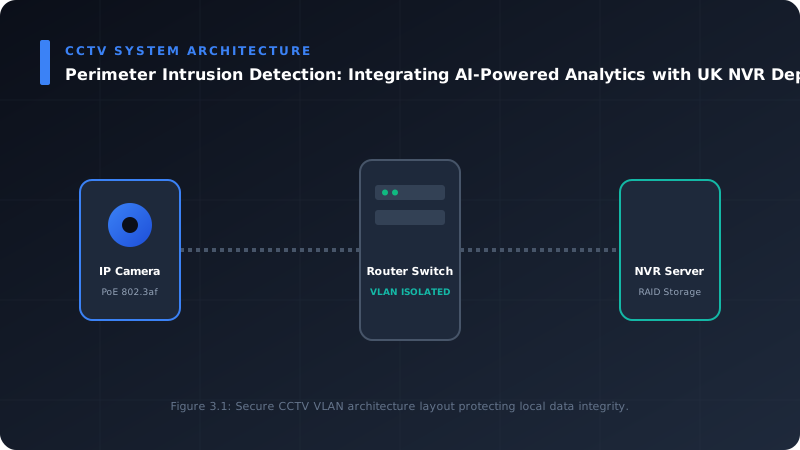
- Network Segmentation (VLANs): Isolate CCTV traffic onto its own VLAN to prevent congestion and enhance security.
- Redundancy: Consider redundant network paths for critical cameras or NVR connections.
#### 5. Configuration Steps (Generalised)
##### 5.1. Camera Setup
- IP Addressing: Assign static IPs or use DHCP reservations for all cameras.
- Image Settings: Fine-tune WDR, exposure, gain, noise reduction, and IR settings for optimal clarity day and night.
- Firmware: Ensure cameras are running the latest stable firmware.
- Edge Analytics Activation (if applicable): Enable the desired analytics modules (e.g., line crossing, intrusion detection) within the camera's web interface.
##### 5.2. NVR Integration
- Add Cameras: Register cameras with the NVR using their IP addresses and credentials. Verify video streams are stable.
- Recording Schedules: Configure continuous and event-based recording schedules.
- Storage Management: Set up hard drives, RAID if applicable, and data retention policies.
##### 5.3. Analytics Configuration (NVR or Camera-based)
- Draw Detection Zones: Precisely define virtual lines (tripwires) and polygonal areas (intrusion zones) on the video feed. These should correspond to vulnerable points identified in the site survey.
- Set Object Classification Rules: Configure the system to trigger alarms only for specific object types (e.g., "human" or "vehicle"). This is key to false alarm reduction.
- Directional Rules: For line crossing, specify the allowed direction(s) of travel that trigger an alarm.
- Sensitivity Tuning: Adjust the sensitivity levels. Start with a moderate setting and refine during testing. Many systems offer "learning" modes to adapt to the environment.
- Object Size Filtering: Set minimum and maximum object sizes (in pixels or percentage of screen) to filter out small animals or distant, irrelevant objects.
- Duration Filtering: Require an object to be in a zone for a minimum duration (e.g., 3 seconds) before triggering an alarm, useful for filtering quick, benign movements.
- Schedule Activation: Define when analytics rules are active (e.g., 24/7, or only outside business hours).
##### 5.4. Alarm Management
- Define Alarm Actions:
- NVR Recording: Trigger full-frame rate, high-quality recording upon alarm.
- Notifications: Push notifications to mobile devices, email alerts to security personnel.
- Audible Alarms: Trigger local sirens or PA systems.
- Visual Deterrents: Activate strobe lights.
- PTZ Preset Recall: If using PTZ cameras, move them to a pre-defined position to verify the alarm.
- Integration with ARCs (Alarm Receiving Centres): For UK sites requiring remote monitoring, configure the NVR to send alarm events and associated video clips to an NSI or SSAIB accredited ARC for verification and dispatch of security services.
- Event Logging: Ensure all alarms are meticulously logged with associated video clips for audit and review.
##### 5.5. Testing and Calibration
- Systematic Walk-Throughs: Conduct staged intrusions by walking and driving through detection zones at different speeds, angles, and times of day/night.
- Environmental Simulation: If possible, test under varying weather conditions or simulate them where practical (e.g., activating sprinklers for rain).
- False Alarm Analysis: Record and analyse any false alarms. Adjust detection zones, sensitivity, classification rules, and object filters until the false alarm rate is minimised to an acceptable level. This iterative process is crucial.
- Verification: Ensure that alarms are reliably transmitted to the NVR, logged, and trigger the defined actions.
#### 6. Compliance and Best Practice (UK Specific)
- GDPR (General Data Protection Regulation) & DPA 2018:
- Legitimate Interest: Ensure there is a clear legitimate interest for deploying CCTV, particularly with analytics.
- Data Minimisation: Only collect necessary data.
- Data Retention: Adhere to defined data retention policies (e.g., 30 days is common for general security).
- Public Signage: Clearly display prominent signage informing individuals they are being recorded, providing contact information for the data controller.
- DPIA (Data Protection Impact Assessment): For systems using advanced analytics, especially those with facial recognition or highly intrusive monitoring, a DPIA may be mandatory.
- BS EN 50132-7: Code of practice for planning, installation, and maintenance of CCTV systems. Adherence ensures professional standards.
- NSI / SSAIB Certification: Utilising installers certified by National Security Inspectorate (NSI) or Security Systems and Alarms Inspection Board (SSAIB) ensures competence, quality, and adherence to relevant British and European standards. This is often a requirement for insurance purposes and police response to alarms.
Maintenance and Future-Proofing
- Regular Software Updates: Keep NVR firmware, camera firmware, and analytics software updated to leverage new features, security patches, and performance improvements.
- Routine Cleaning: Regularly clean camera lenses and housings to prevent image degradation that could impair analytics performance.
- Periodic Re-calibration: Re-evaluate and re-calibrate analytics rules periodically, especially if the environment changes (e.g., new foliage growth, construction).
- Scalability Planning: Design the system with headroom for future expansion of cameras or analytical capabilities.
- AI Model Retraining: For highly advanced systems, the ability to retrain AI models with site-specific data can further enhance accuracy.
Conclusion
The integration of AI-powered analytics with UK NVR deployments represents a paradigm shift in perimeter intrusion detection. It moves us from reactive observation to proactive, intelligent threat mitigation. By leveraging object classification, behavioural analysis, and sophisticated filtering, we can achieve significantly higher detection accuracy and drastically reduce the burden of false alarms.
As a UK-certified installer, I advocate for a meticulous, engineering-grade approach to design and implementation, adhering to national standards and data protection regulations. The result is a robust, efficient, and intelligent security system that truly protects assets and provides peace of mind.
For a detailed consultation on how these advanced AI perimeter detection solutions can be tailored to your specific UK site requirements, please use the online contact page. We are here to help engineer your next-generation security infrastructure.
---
Frequently Asked Questions (FAQ)
1. What is the primary benefit of AI analytics over traditional motion detection for perimeter security?
The primary benefit is a drastic reduction in false alarms and significantly increased detection accuracy. Traditional motion detection simply identifies pixel changes, leading to alerts from swaying trees, shadows, rain, or small animals. AI analytics, through deep learning, can classify objects (e.g., human, vehicle, animal) and understand behaviours (e.g., loitering, crossing a line in a specific direction), ensuring that only relevant events trigger an alarm, thus preventing operator fatigue and improving response times.
2. Can AI analytics integrate with my existing NVR system?
It depends on the capabilities of your existing NVR and cameras. If your cameras are "AI-enabled" (performing edge analytics), many modern NVRs can receive and record these intelligent events. If your NVR itself has integrated AI processing capabilities, it might be able to run analytics on streams from standard IP cameras. However, older NVRs or basic models may require an upgrade or the introduction of a dedicated analytics server to gain advanced AI functionalities. A compatibility assessment by a certified installer is essential.
3. How do AI systems minimise false alarms effectively?
AI systems minimise false alarms primarily through:
- Object Classification: Distinguishing between humans, vehicles, animals, and environmental factors.
- Behavioural Analysis: Understanding the context of movement (e.g., a person walking into a restricted zone versus a branch swaying).
- Directional Filters: Only alarming if an object crosses a virtual line in a specific, prohibited direction.
- Size & Duration Filters: Ignoring objects that are too small, too large, or only briefly present in a zone.
- Scene Learning: Adaptively learning environmental patterns over time to further refine detection.
These combined capabilities drastically reduce nuisance alerts compared to basic pixel-change detection.
4. What are the key UK regulatory considerations for deploying such systems?
In the UK, the General Data Protection Regulation (GDPR) and the Data Protection Act 2018 are paramount. You must ensure:
- A clear legitimate interest for deploying the system.
- Data minimisation (only collect what's necessary).
- Transparent public signage informing individuals they are being recorded, including contact details for the data controller.
- Adherence to defined data retention policies.
- Consideration of a Data Protection Impact Assessment (DPIA) for highly intrusive or advanced analytical deployments.
Additionally, adherence to British Standards like BS EN 50132-7 and using installers accredited by organisations like NSI or SSAIB ensures compliance with industry best practices and often satisfies insurance requirements.
📊 Technical System Design Reference Infographic
Related Technical Resource: Securing Wireless CCTV Networks: A Deep Dive into WPA3-Enterprise and VLAN Segmentation
Technical Standards and Industry Resources
- External Compliance Guidance: Industry Standards & Compliance Resources
- Partner Site Feed: Gary Pearce Portfolio Services - Carrd Profile


Comments